Snapshot example not working

Hi all,

I’m testing the mmf2_video_example_v1_snapshot_init() example on the Ameba Pro2 platform, but it’s not working correctly.
Below is the log I get when I run it:

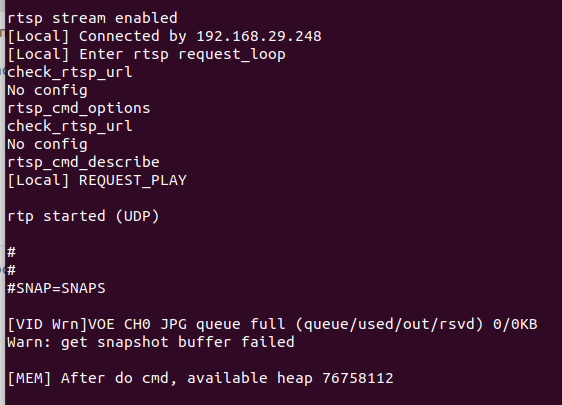
SNAP=SNAPS

[VID Wrn]VOE CH0 JPG queue full (queue/used/out/rsvd) 0/0KB
Warn: get snapshot buffer failed

[MEM] After do cmd, available heap 76771680

t seems like the snapshot buffer allocation is failing (VOE CH0 JPG queue full).
Has anyone faced a similar issue or knows how to fix this?
I’m running the example without modifying the default configuration.

Thanks in advance for any help! :folded_hands:

I have just tried the example mmf2_video_example_v1_snapshot_init()no issue for me.

So could you help me to do the following checks

  • cam sensor setup. Before compile have to update the right sensor for streaming sensor.h
    • line 166,169,176
  • network setup. After update bin into IC, lets connect to a 5G network and start streaming when client connect by RTSP address.
    • if you able to see the streaming, there will not be any issue. Then can start snapshots….

if you still have some issues, could you please provide the logs for example. So i can dig deep.

Could you share your SDK version with me so I can run some tests? Thank you.

My SDK version is the same one available in the official GitHub repository.
I’m using exactly the camera sensor and files you provide for the Ameba Pro2 Mini board with the F-37 sensor.
Everything is taken from your provided package, but it is still not working on my side.

Could you please check and help?
Thank you.

Ok let me try the SDK to see if we can reproduce the issue.

Could I know your WiFi condition? 2.4/5G? Does the video streaming working smooth? or have any lags?

Hi Michael,

Thank you for the quick response.

My WiFi environment is Jio 5G, and the video streaming is working smoothly with no lags.

Hi @ravinder ,

Thanks for your patience. But I haven’t encountered any issues when running this demo.

Let me list all the steps and details below. Please review them and see if anything differs on your side or if there’s anything that may be causing the problem.

1, clone/download the Freertos SDK,

main branch, https://github.com/Ameba-AIoT/ameba-rtos-pro2.git

the latest commit should be Update code base · Ameba-AIoT/ameba-rtos-pro2@3b947a6 · GitHub

2, setup all tools and toolchain, refer to read.me

3, update sensor.h and choose the sensor

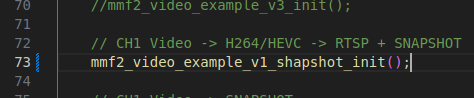
4, update video_example_media_framework.c choose the example,

line 64

	//mmf2_video_example_v1_init();

line 73

	mmf2_video_example_v1_shapshot_init();

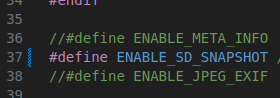
5, update mmf2_video_example_v1_snapshot_init.c setup SD card mode

line 37

#define ENABLE_SD_SNAPSHOT //Enable the snapshot to sd card

6, compile

clean build, remove “build“ folder and create again at GCC-RELEASE

rm -rf build
mkdir build
cd build

compile toolchain

cmake .. -G\"Unix Makefiles\" -DCMAKE_TOOLCHAIN_FILE=../toolchain.cmake -DVIDEO_EXAMPLE=ON 

compile flash

cmake --build . --target flash 

7, upload bin into board

use the image tool to upload the “flash_ntz.bin” to board.

8, connect WiFi and RTSP streaming

AT command

ATW0=[SSID]
ATW1=[Password]
ATWC

find the IP address and display device connect to the IP, then start RTSP streaming.

9, SD card and snapshot.

make sure the SD card are insert correctly.

AT command for snapshot and save as jpg inside SD card

SNAP=SNAPS

Hi @M-ichae-l,

I followed all the steps you provided exactly.
I also uploaded screenshots showing the changes I made and the log output.

enable sd snap

framework.c

RTSP is working fine, but when I try the snapshot command SNAP=SNAPS, I still get this error:

[VID Wrn]VOE CH0 JPG queue full (queue/used/out/rsvd) 0/0KB
Warn: get snapshot buffer failed

Even after enabling ENABLE_SD_SNAPSHOT and selecting the correct example, the issue remains.

Could you please check why the snapshot JPEG queue is not initialized

Thanks.

flash_ntz.zip (1.7 MB)

Would you like to try my firmware to help to narrow down if it is a HW issue?

And provide yours to me, thanks.

Hi @M-ichae-l,

Thank you for your support.

Right now I am able to get the snapshot output.
Thanks again for your help!

1 Like

Hi @M-ichae-l,

Thank you for your support.

Right now I am able to get the snapshot output — thanks again for your help!

I noticed one thing during testing:
If I set #define ENABLE_FCS 0, the snapshot works correctly.
But if I keep #define ENABLE_FCS 1, the snapshot does not work.

Could you please clarify why the snapshot fails when FCS is enabled, and what the exact purpose of FCS is in this firmware?

Thanks again for your guidance.


Hi @ravinder,

I see. The #define ENABLE_FCSwith enabled will cause the “queue“ issue. Thanks for finding it out.

FCS mode will start init the camera module before the application start, that happens at the boot stage. The queue length set at boot stage may not suitable for this example, which the default example does not include FCS option.

Currently, we can just disable the FCS to let the function work, or update/adjust the queue length at boot stage for snapshot (not recommended). There will be more specific and detail FCS guide in future. Therefore, currently I suggest we can processed with no FCS.

And actually, on/off FCS dose not important for this example working well (snapshot).