Camera sensor init failed (GC2053)

Hello,
I’m using the demo HTTPDisplayJPEGContinuous from Arduino IDE, toolchain version AmebaPro2/4.0.9-build20250805, with * Camera Options:”GC2053”. The problem is that the camera sensor cannot initialize correctly:

Interface 0 IP address : 192.168.1.85
[video_voe_presetting] fps:30  w:1920  h:1080   
fwin(1),enc_en(0),IQ_OFFSET = 0x17940
 fwin(1),enc_en(0),SENSOR_OFFSET = 0x27480
sensor id 1 iq_data 17940 sensor_data 27480
VOE not init
VOE_OUT_CMD type 2 command fail -1
hal_voe_ready 0x0 0xbf1208 
 read fcs_status 0x000000bf
[video_init] uvcd iq is null, use default.
[video_init] uvcd SNR is null, use default.
IQ:FW size (64309)
sensor:date 2024/9/12 version:RTL8735B_VOE_1.5.7.0
sensor:FW size (3996)
sensor timestamp: 2024/09/12
iq timestamp: 2024/12/03 17:04:15
voe_heap malloc 0x70440460, size 13912832
ISP:1 ENC:1 H265:1 NN:1
hal_voe_ready 0x0 0xbf1208 
voe   :RTL8735B_VOE_1.6.2.0 
sensor:RTL8735B_VOE_1.5.7.0 
hal   :RTL8735B_VOE_1.6.2.0 
load time sensor:112us iq:1772us itcm:0us dtcm:0us ddr:0us ddr2:0us
[video_pre_init_procedure] START
hal_voe_send2voe too long 165669 cmd 0x00000206 p1 0x00000000 p2 0x00000000
VOE command 0x206 fail ret 0x1
VOE_OPEN_CMD command fail
hal_video_open fail
hal_voe_ready 0x0 0x1718 
[VID Err]Please check sensor id first,the id is 1
[INFO] Create TCP socket successfully

Same result, whatever is selected for Camera FCS mode, disabled or enabled.
The build logs show that the GC2053 option is correctly taken:

cp -r misc/video_img/SENSOR_GC2053/* ./
cp misc/video_img/voe.bin ./
cp misc/video_img/fcs_data_dummy.bin ./
cp misc/video_img/iq.bin ./
cp misc/video_img/sensor.bin ./
cp misc/video_img/SENSOR_GC2053/amebapro2_isp_iq.json ./
cp misc/video_img/fcs_data_gc2053.bin ./
cp misc/video_img/iq_gc2053.bin ./
cp misc/video_img/sensor_gc2053.bin ./

I have 2 new GC2053 cameras bought recently, both fail the same.

How can I debug this ?

Thanks for support.

Marc

Hi @Marc ,

Do you have the purchase link for GC2053 that you have bought ? Did you use any adapter to connect to the board? Thank you

Hello @Pammy ,
yes, here it is:

https://fr.aliexpress.com/item/1005009031136307.html

This camera is already equipped with a 24 pin MIPI connector, so I don’t use any extra adaptor.

I need a ~70° FOV camera compatible with the amb82 mini. If you have a better reference I can have a look too :slight_smile:

Regards,

Marc

Hi @Marc ,

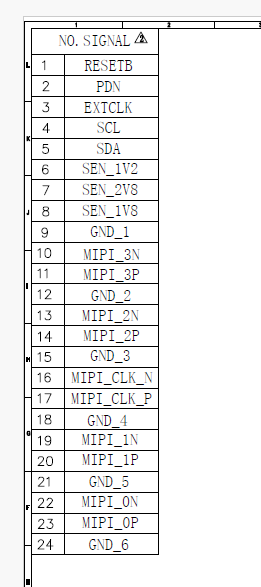
From the link you shared, the pinout table for the GC2053 camera is not the same as the pinout table for AMB82 Mini. Thats why you get “ [VID Err]Please check sensor id first,the id is 1 “ error

AMB82 Mini:

GC2053 you bought.

You can download the camera module datasheet here

Hello @Pammy ,

That’s what I feared. So there is no standardization for the 24pin MIPI pinout. Bad luck for me.

Is this possible to adapt the pinout by software ?

Otherwise, where can I find a camera compatible with the amb82-mini pinout ? My only constraint is on the FOV, to be around 70°. For the sensor resolution, it can be 2 or 5MB.

Thanks for your time,

Marc

Hi @Marc ,

You can consider using the GC5035 sensor and reach out to Kevin’s lab (https://blog.makdev.net/) to check if they have it available.

hi.

i have bought gc2053 (fov 75°). camera is working.

https://aliexpress.ru/item/1005009683171475.html?businessType=ProductDetail&sku_id=12000049850725226&spreadType=socialShare&srcSns=sns_More&utm_medium=sharing

We will soon release a new “Sensor Bright-Up User Manual.”

The manual provides guidance on activating the sensor via software after the hardware setup is completed. Please stay tuned for the upcoming document release.

Glad to hear that you guys are developing a user manual for this because I am having the same issues trying to operate my own camera sensor. Any updates on whether it will be releasing any time soon?

Hi, @Sam_Samedi

Lets refer to following links for more information,

https://www.amebaiot.com/en/datasheet-download-amb82-mini/

https://www.amebaiot.com/en/camera-module-bring-up-guide/